Dear Robin,
Thanks for your question. Though fiber (best) and cable are preferred, I saw and heard Starlink work really decently 😃 for a musician I tech-supported last month! They were using Starlink Gen 3.
To get rid of crackling audio, try the first suggestion below. If that doesn’t fix the problem, try the second suggestion, etc.
- Avoid Bluetooth headphones/mics. If you test with your Ear Pods again, make sure they’re wired EarPods, not Bluetooth wireless AirPods.
-
Turn Windows Signal Enhancements off for the mic you’re using.
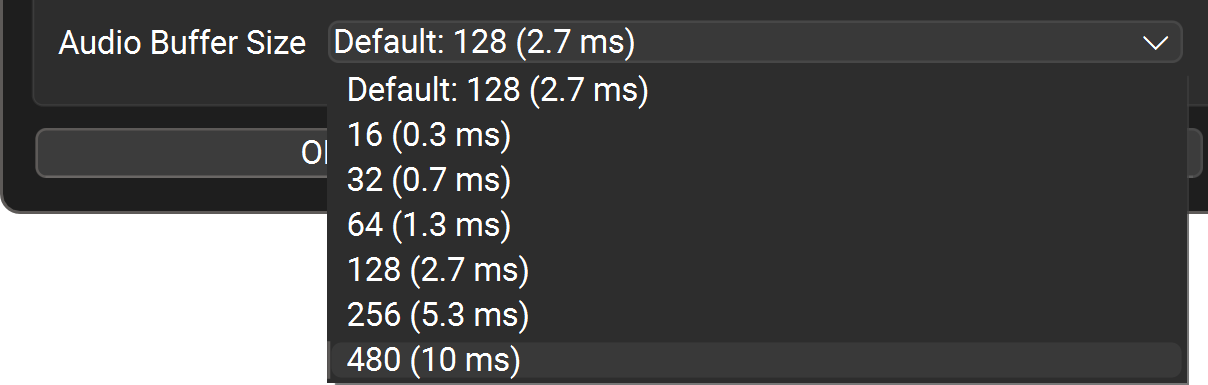
- In FarPlay’s Preferences
 > General Options, raise the Audio Buffer Size to 480 (10 ms).
If you’re still not getting clear audio, we’d be grateful to know.
If you now have clear audio, but wish to reduce latency, use an audio device with manufacturer-supplied ASIO drivers, like the iRig Stream Mic USB, plug your headphones into the ASIO device, and follow the steps in the version of our QuickStart guide customized for Windows PCs with external audio interfaces.
Thank you,
David Liao
-
This reply was modified 3 months ago by
 David Liao.
I tried everything I could w/ Starlink and it’s just not going to work…even with the adapter or whatever for 2nd gen. I tried. Neither can do this yet. I have to go to our business in town (only 15 mins away), plug my laptop into my fiber router and at that point, it’s like hot dogs in buns. Works like a champ!
Hi Mike,
Sorry FarPlay didn’t work on Starlink Gen 2 for you. Thanks so much for sharing. I’m glad you were able to find a fiber connection nearby. If you happen to upgrade to Starlink Gen 3 at some point, you might like to test again.
Thank you,
David Liao
-
This reply was modified 2 months, 3 weeks ago by
David Liao.


 > General Options, raise the Audio Buffer Size to 480 (10 ms).