Being heard by my partner

-
Hi Sarah,
Thanks for your post. Please open a FarPlay session (could be just by yourself). Look in the You (…) subpanel. If your mute button is blue
 , click the mute button to unmute yourself (the mute button will turn black ).
 If this doesn’t fix the problem, check whether the level meter in the You (…) subpanel flickers when you speak.
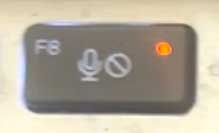
If the level meter doesn’t flicker, try pressing mute buttons on your mic, headset, and computer keyboard (example below).
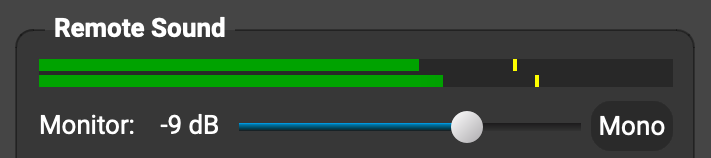
If there wasn’t a problem on your end (you didn’t need to click any mute button in FarPlay or on your mic, etc.), ask Gaye to go into a FarPlay session (just by herself) and drag the Monitor slider in the Remote Sound subpanel to the right. When this slider is too far to the left, Gaye won’t hear you.
Also have Gaye press volume-up buttons/keys on her headset and computer keyboard.Interested to know whether these tips help. If you’d like to browse additional suggestions, please check out our Troubleshooting Guide — browse the tips under Someone is too quiet or too loud.
Thank you,
David Liao-
This reply was modified 3 months, 3 weeks ago by
 David Liao.
-
This reply was modified 3 months, 3 weeks ago by
David Liao.
David,
Thank you so much for your exhaustive reply!!!
My computer was a little wonky but somehow it got itself straightened out and we were able to hear each other. In today’s session, Gaye was having some issues but, unbeknownst to her as to what she did, she was finally able to hear. We’re smart idiots!I’ve copied your response and will send it to Gaye because it has so many great suggestions of things to try, something we never know how to do. And I’ll keep my copy at my laptop piano for future reference.
Thanks again, so much. We both appreciate the heck out of you!
Sarah
Dear Sarah,
You’re very welcome, and thanks for your kind update 🥰! I’m so glad you and Gaye were able to hear each other.
Thank you,
David LiaoDavid,
It’s me again, Sarah. Gaye and I are having difficulty the the latency. We’ve played with the latency bar but it doesn’t seem to help. As the host of the session, I don’t see a latency reading, only a dB reading. Gaye’s latency reading this evening was 63ms. If she moved the latency lever to the left, it went down to about 55; to the right, it went up to something in the 200s. And, of course, the sounds was wonkier.
Actually, this has been an issue for a long time; we’re just getting itchy enough to want to figure it out now.
I look forward to reading your suggestions.Many thanks,
SarahHi Sarah,
Thanks for your question! On your Windows PC, please go to Preferences
> General Options, change the Audio Buffer Size to 128 (2.7 ms), and then press OK.FarPlay 1.3.2 (released in April) increased the default audio buffer size for Windows audio to 480 (10 ms) because some audio devices need this large, higher-latency buffer size to work reliably with Windows. However, I think you were using a Logitech headset with a PC that might have worked fine with the old default buffer size of 128, so simply try using that smaller, lower-latency buffer size again to see if that solves the problem. (Or did the high latency start before April?)
Btw, to look at the latency reading, look just under the latency slider.
On your screen, the Remote Latency shows you an estimate of how much time it takes sound to get from Gaye’s microphone to your headphones, and on Gaye’s screen, the Remote Latency shows her an estimate of how long it takes sound to get from your microphone to her headphones.Thank you,
David Liao-
This reply was modified 2 months, 1 week ago by
David Liao.
-
This reply was modified 2 months, 1 week ago by
David Liao.
-
This reply was modified 2 months, 1 week ago by
David Liao.
-
This reply was modified 2 months, 1 week ago by
David Liao.
Thank you, David. I appreciate your suggestion and clarification.
Sarah (and Gaye)
You’re welcome! 🥰
David Liao -
This reply was modified 3 months, 3 weeks ago by

 , click the mute button to unmute yourself (the mute button will turn black
  ).
). 

 > General Options, change the Audio Buffer Size to 128 (2.7 ms), and then press OK.
- You must be logged in to reply to this topic.