Reply To: Farplay not receiving my output

Dear Chris,
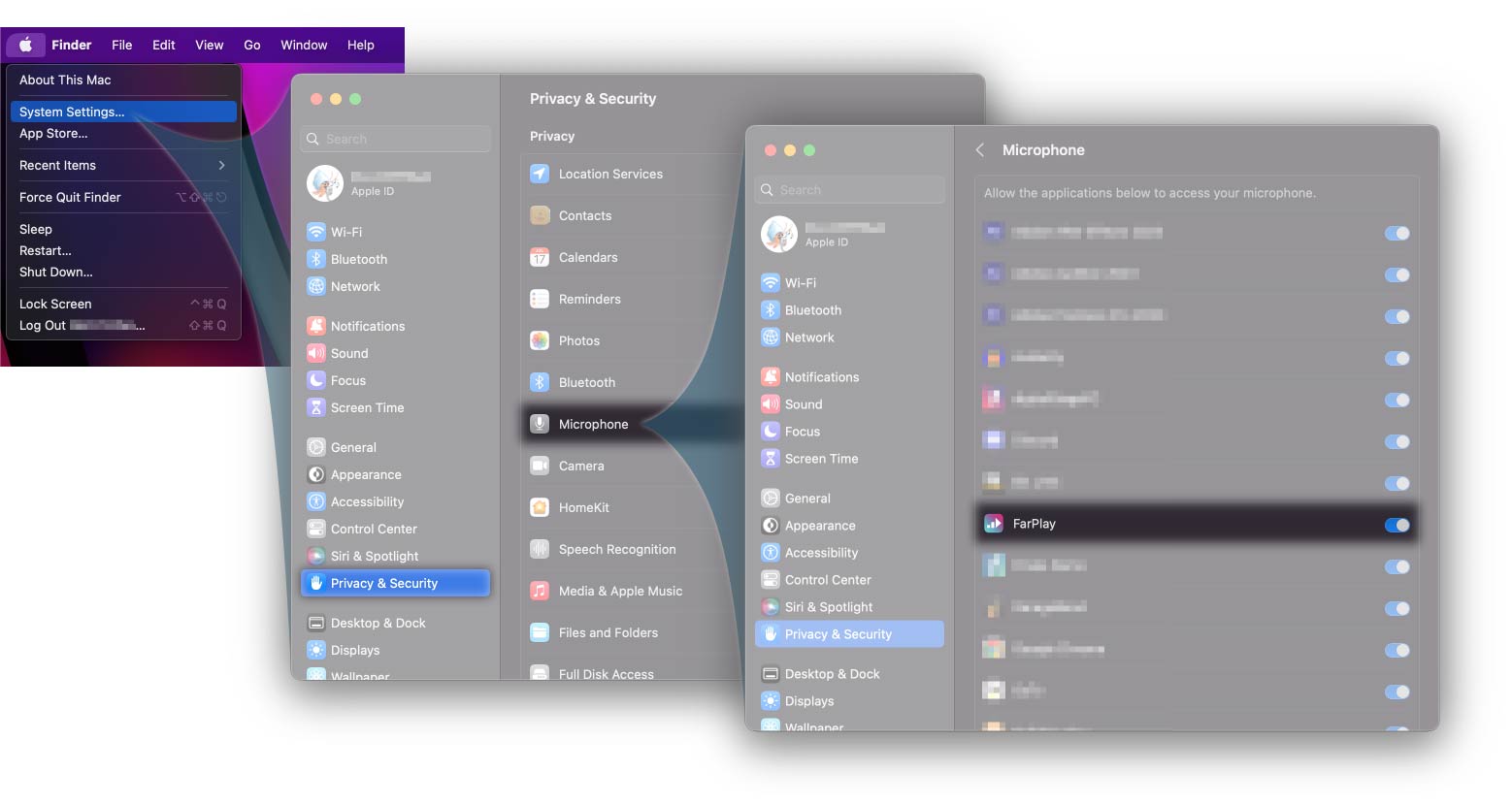
Thanks for your post. Please quit FarPlay and open your Mac’s System Settings > Privacy & Security > Microphone. Scroll down to FarPlay. Make sure the toggle switch for FarPlay is ON. Reopen FarPlay and check whether you now have microphone input. A link to this solution can be bookmarked at our Troubleshooting Guide (look under “Someone is too quiet or too loud” > “I’m too quiet for other people”).
If that doesn’t work, look in the “You (…)” subpanel in FarPlay’s main window. Use the Channels pull-down menu to try other channels (for example, switching from “Mono 1” to “Mono Mix 1-2” would fix the problem if you just had one mic plugged into your RME Fireface’s input channel 2). If you’d like to bring in audio from several input channels on your Fireface, use FarPlay’s Input Mixer.
Please let us know if you’d like more suggestions.
Thank you,
David Liao
-
This reply was modified 4 months, 1 week ago by
 David Liao.
-
This reply was modified 4 months, 1 week ago by
David Liao.
