Reply To: Can’t hear myself in headphones once I join a session

Dear Jennifer,
Thank you for the update and the description of the back of your Yeti.
Yes, sadly, I’ve found ChatGPT unreliable for tech support for FarPlay. It’s faster and easier to get set up with our QuickStart Guide and then, if needed, our Troubleshooting Guide and this forum. If you’d like, you can sign up for FarPlay’s monthly support sessions. Support sessions are free to subscribers and students of teachers who have the “For Teachers” subscription.
Even if your earbuds with USB-C plug haven’t arrived, you can try to get rid of the echo your teacher hears by clicking on the Microphone pull-down menu in the Devices subpanel (below) and choosing “Microphone Array”, if available (if your PC has a built-in mic called something other than “Microphone Array”, pick that instead).
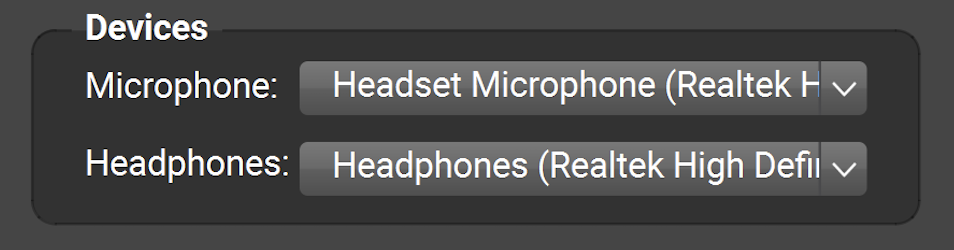
Plugging earbuds with included mic into the 3.5-mm jack on a computer typically works great (including when the earbuds and mic both show up as “Realtek”, as they often do on PCs). In occasional cases, (I think this might have happened to you), the signal from the earbuds portion of a headset can leak into the microphone portion (electrical-connection issue), causing the remote musician to hear an echo. Switching from the mic of the earbuds to a PC’s built-in mic solves this problem (switching to earbuds with USB plug like you suggested can work too).
Though ChatGPT commented that the computer would “recognize the headphones and the mic separately” for earbuds with USB-C plug, USB earbuds might still show up with the same or similar names in FarPlay’s Microphone and Headphones lists (like how the earbuds and mic with 3.5-mm plug showed up as “Realtek” in both lists), and this is perfectly fine 👍.
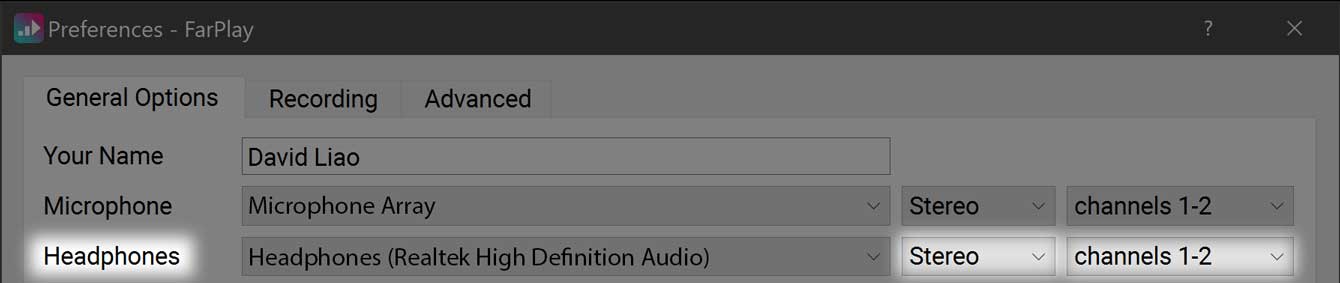
To hear your teacher in both ears (not just your right ear), go to Preferences  > General Options. In the Headphones row, make sure “Stereo” (not “Mono”) and “channels 1-2” are selected.
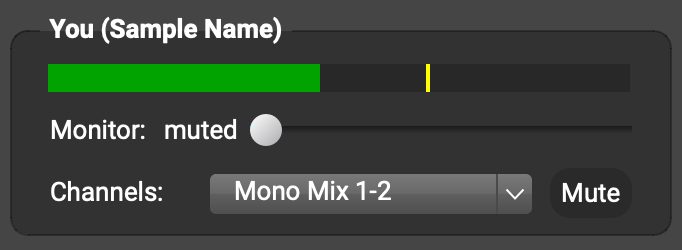
If you still hear your teacher only through your right ear, ask your teacher to use the Channels: pull-down menu under You (…) to select Mono Mix.
Thank you,
David Liao
-
This reply was modified 6 months, 2 weeks ago by
 David Liao.
-
This reply was modified 6 months, 2 weeks ago by
David Liao.
-
This reply was modified 6 months, 2 weeks ago by
David Liao.
-
This reply was modified 6 months, 2 weeks ago by
David Liao.
-
This reply was modified 6 months, 2 weeks ago by
David Liao.
-
This reply was modified 6 months, 2 weeks ago by
David Liao.
-
This reply was modified 6 months, 2 weeks ago by
David Liao.
