Dear Maick,
Happy you’re able to connect with your musician friend.
Broadcast Output, available with Standard+ and For Teachers subscriptions, lets you send a very high-quality copy of live FarPlay audio to other apps. To send audio from FarPlay to OBS, follow the livestreaming instructions section of our Broadcast Output page (except replace Restream, the example livestreaming app on that page, with OBS).
You can use OBS to capture the FarPlay Video window to share in a livestream, like Dan Tepfer did here. Simply create a Display/Screen Capture source for an OBS scene.
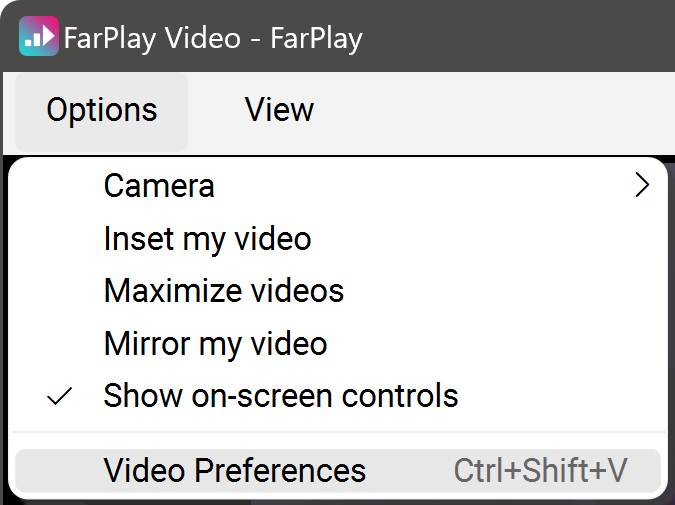
To hide the control buttons at the top-left corner of FarPlay’s video window, click the Options menu and uncheck Show on-screen controls. (Mac users should click the Video menu in the menu bar, instead of the Options menu, which isn’t shown on Macs).

If using OBS to capture FarPlay’s video window uses too much processor power on your PC, a great alternative is to use the built-in video in a livestreaming app like Restream. The webcam video feeds in this example are from a Restream livestream that was originally broadcast to Facebook. If you use Broadcast Output to send audio from your FarPlay session to a livestream app, make sure the other performer mutes their mic in the livestreaming app and mutes the browser tab running the livestreaming app, as indicated in the “Prevent echos” section of our Broadcast Output page.
Thank you,
David Liao
-
This reply was modified 16 hours, 24 minutes ago by
 David Liao.
-
This reply was modified 16 hours, 21 minutes ago by
David Liao.
-
This reply was modified 16 hours, 17 minutes ago by
David Liao.
-
This reply was modified 16 hours, 15 minutes ago by
David Liao.