Reply To: High latency in Fedora 43

Dear José,
EDIT: Please first try the suggestions in the next message below, which includes some feedback from our head developer, Anton.
Thanks for the update. Could you try the following? Screenshots below are adapted from QjackCtl’s documentation at Sourceforge.
- Quit FarPlay.
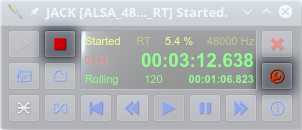
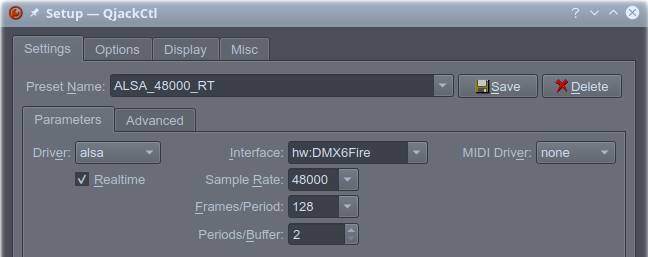
- Open QjackCtl. If the Stop button is red, click the Stop button. Click the Setup button (wrench).

- In Setup > Settings > Parameters, set the Driver to alsa, the Realtime option to checked ✓, the Interface to your Komplete Audio interface, the Sample Rate to 48000, the Frames/Period to 32 (you can try 16 for lower latency or 64 for higher stability later), and the Periods/Buffer to 2. Press OK.
- In the main QjackCtl window, press the green Play button (to the left of the stop button).
- Open FarPlay. In Preferences > General Options, choose the JACK listings for your Komplete Audio interface for Microphone and Headphones.
- Check whether local latency improved.
Thank you,
David Liao
-
This reply was modified 5 months, 2 weeks ago by
 David Liao.
-
This reply was modified 5 months, 2 weeks ago by
David Liao.
-
This reply was modified 5 months, 1 week ago by
David Liao.
