
Reply To: Still won’t connect

Dear Enrique,
Thank you for your screenshot. The status line at the bottom of the error message (“Local / remote network status: NAT / Symmetric NAT“) confirms that the connection is being blocked at the musicians’ end in India.
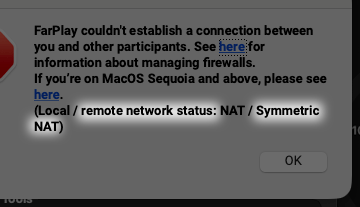
A Public IP from the internet provider typically eliminates the “Symmetric NAT” status, with some exceptions. To make sure the Public IP each musician requested from their internet provider is working, please ask each musician in India to:
- Confirm with their internet provider that the Public IP is already switched on for the internet connection they’d like to use to rehearse.
- Restart their router after the Public IP is switched on.
- Make sure their computer connects through only one router, not through a second router plugged into the internet provider’s router or modem.
- Try connecting in FarPlay again.
If a musician’s internet provider can’t give them a Public IP, ask the musician to ask the provider to turn on IPv6 instead. IPv6 helps only if it’s turned on at each end, so, in that case, please ask your own internet provider in Spain to turn on IPv6 too.
If you only need to connect to one musician in India at a time (duet, instead of group rehearsal), port forward on your end.
If FarPlay still can’t connect after these steps, please send a new screenshot of the “FarPlay couldn’t establish a connection” message, and share what each internet provider said.
Thank you,
David Liao
-
This reply was modified 3 weeks, 4 days ago by
 David Liao.
-
This reply was modified 3 weeks, 4 days ago by
David Liao.
