Recording Mix Yields blank audio file
-
version 1.4. First Recording worked mostly ok, but had a mild clicking in the background. Second recording had no audio from the members, but had a low level steady clicking sound. Everybody sounded fine in my headphones during the recording. File attached.
Attachments:

-
[Edit, November 4, 2026]: If you use FarPlay 1.4 on an Apple silicon Mac and your recordings repeat in a loop, contain audio from an earlier recording, or end in silence, here’s a workaround until we release a fix:
- Quit FarPlay.
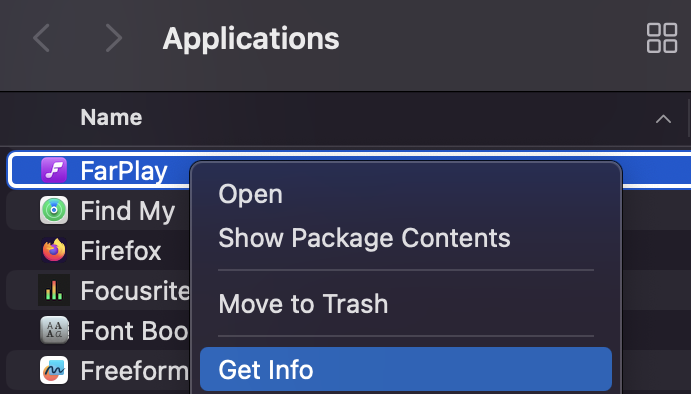
- In Finder, open your Applications folder, Control-click FarPlay, and choose Get Info.

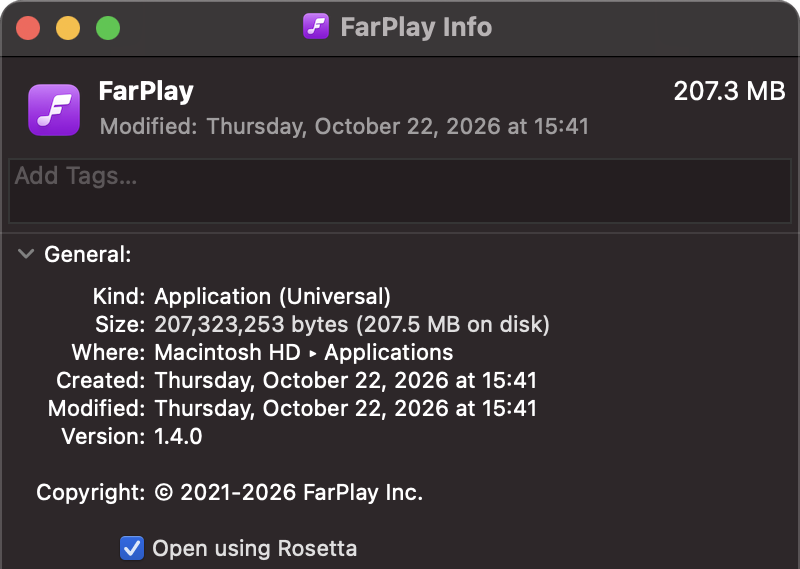
- In the Info window, tick Open using Rosetta, then close the window.
- Open FarPlay. If your Mac asks to install Rosetta, click Install.
This setting makes FarPlay run its Intel version, and it stopped the problem in 10 short test recordings on my Mac with macOS 15 Sequoia. If you try it, please post your macOS version and whether the problem stopped. Once the fix is out, untick Open using Rosetta.
The original reply continues below.
—
Hi Vince,
Thank you for attaching the 10-29-26.wav file above. Could we also get the following files and info?
- Could you upload all the .wav files FarPlay saved (for the recording with mild clicking in the background and also for the recording that only had low-level steady clicking), as FarPlay saved them, without trimming them or re-saving them in another app? Please use the Google Drive folder I created for you (I emailed the link to you).
- Please tell me which folder you saved the recordings in (for example, Desktop or Documents), and whether Dropbox, iCloud Drive, Google Drive, or another app syncs that folder. Avoid saving recordings to folders that are in network drives or live-synced by back-up apps — pause syncing in Dropbox, etc.
- Did any window or message pop up during or after either recording? If so, what did the message say (as closely as you can remember)?
- Did anyone in the session, you or another participant, change, plug in, unplug, or reconnect any audio device during either recording?
- I understand everybody sounded fine in your headphones during the second recording. Did everybody sound fine (no clicking) in your headphones in the first recording too?
- Were the recordings made on Mac or Windows?
Thank you,
David Liao-
This reply was modified 2 weeks, 6 days ago by
 David Liao.
-
This reply was modified 2 weeks, 6 days ago by
David Liao.
-
This reply was modified 2 weeks, 1 day ago by
David Liao. Reason: Updated with workaround
-
This reply was modified 2 weeks, 1 day ago by
David Liao. Reason: Fixed date in update
-
This reply was modified 2 weeks, 1 day ago by
David Liao.
I use a Mac Studio M4 Max 64GB Ram, 2TB Mac HD, External SSD is 4TB ugreen m.2 TB4 (40gbps) with WD Black {WD_BLACK SN850X 4TB NVMe SSD – M.2 2280, Up to 7,300 MB/s Read speeds, Up to 6,300 MB/s write speeds, Gaming Expansion, High Performance Internal Solid State Drive – WDS400T2X0E}.
I use this computer and external drive successfully with Pro Tools recording 16+ tracks simultaneously while playing 24+ tracks.
I uploaded the recordings from 10-29 and several others I made today (11-1) with just me in FarPlay. Each new recording from today has the tail-end from the previous recording, and one of the recordings has the tail-end from the prior recording repeating in an endless loop for the duration of the recording.Hi Vince,
Thank you for the recordings and details about your Mac. This problem is indeed super strange and surprising. We’re testing this on our side too. Could you provide the following to help?
- Could you describe the exact sequence of actions on October 29 and November 1, from opening FarPlay through your last recording? Between each recording you uploaded and the next, which of these did you do?
- Stop the recording and start another one in the same session.
- Leave the session and start or join a different session.
- Quit FarPlay and open it again.
- Could you check whether the same problem happens in FarPlay 1.3.3?
- Quit FarPlay 1.4.
- Download FarPlay 1.3.3.
- Open the downloaded disk image file, then double-click FarPlay in the window that appears. You don’t need to move FarPlay to your Applications folder, so your copy of 1.4 stays installed.
- Make a few recordings over about half an hour, in the same way and to the same folder as on November 1.
- Tell us whether any recording contains audio from an earlier recording or a repeating loop, and upload all of the recordings to the Google Drive folder, as FarPlay saved them.
I will also send you a private message to look for a time to meet to do some testing together.
Thank you,
David LiaoDear Vince,
As a workaround for now, could you see whether it helps to quit and reopen FarPlay after each recording and to let each recording continue running for a few seconds after the last thing you want to capture? (This is based on testing 1.4 on my Mac).
Thank you,
David LiaoI uploaded several files to the shared drive you created. I named the new recordings to reflect the FarPlay software version.
Version 1.3.3 does not have the problem.
Version 1.4: The first recording is fine, the second gets the repeating loop, and the third has the tail-end of the second spliced to the beginning.
Leave, make new session: The tail-end of the third recording is spliced onto the first recording in new session.
Quit and restart FarPlay: First recording is fine.I don’t use recording that often, so no big rush to fix this. I can always connect an external field recorder to my second headphone jack on the Apollo x8p.
Dear Vince,
Thanks so much for testing, uploading the new recordings, and our separate communications. I added an update to my reply above with the workaround that ended up working for both of us.
Thanks for your graciousness; we definitely want to get this right.
Thank you,
David Liao-
This reply was modified 2 weeks, 1 day ago by
David Liao.


- You must be logged in to reply to this topic.